How to hide the annoying microphone toast message in Microsoft Teams
It seems like I’m one of those poor souls who’s forced to use Microsoft Teams now. Yay… Teams is a terrible service by a terrible company. We all know it, and I’m not going to rant about it here. I do my best to avoid any negativity on my blog.
There’s a lot of things with Teams that annoy me, one of those things, was the—persistent—toast message that kept reminding me, about every 3 seconds, that my microphone was muted. Well. Great observation, Captain Obvious! It was me who muted the microphone… I’m well aware of the fact that the microphone is muted. Duh.
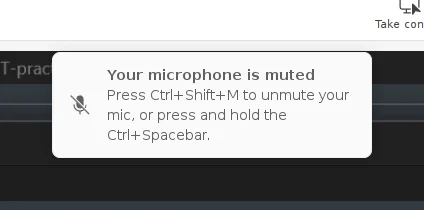
Anyway. I was able to hide it by using this piece of CSS code:
div:has(> div > div > #ufd_content_DeviceSpeakWhileMuted) {display: none;}
The addon Stylus works great if you use Firefox, or any fork of Firefox. However. I use qutebrowser. I simply added the code to a file that I named custom.css, and then pointed to that file in my configuration file ~/.config/qutebrowser/config.py, like this:
config.set('content.user_stylesheets', ['~/.config/qutebrowser/custom.css'])
You can then either restart qutebrowser or just reload the configuration with config-source.
Bonus Tip
I have also found a way to make the left sidebar slightly more compact, simply by hiding the labels and making it thinner.
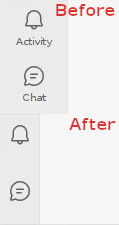
Here’s the code for that:
.fui-AppLayoutArea.___1kr83hz.f1ewtqcl.f1immsc2.f6dzj5z.f10pi13n.f1lvyeyc.fg8on96.f12yfnp8.fibhlys.fav8ueh.f19l78gq.f1asspy.ff8gh7k.fyb0dc9.f1760aly.f1pvy21g.fb2y73i.ffoc445.f4iuumn.f1ceumfd.f1xzzuro.fmq4len.f180iimo.f1w2pcvc.f19xy3ti.f10vmkzp.f1bvojbv.f1o6stv4.f1gyt73z.fwiofl5.f15jae4m.f1gh6hdm.fl4td7.f12vwdbn.f145mhtz.fsxv6q3.fxy6710.f1hwi66u.f1w3aflr.f19sjy7d.f19ayll7.fvu9lbx.f1xunuz7.f1305ibp.f1jtucq0.f1sy8t6p.f1xcw3jt {
	width: 4rem;
}

.fui-FluentProviderr0 {
    --fontSizeBase100: 0px;
}
Feel free to share any improvements to this. I’m not, in any way, an expert on CSS.
Comments
There's no comments for this post. Use this e-mail form if you would like to leave a /public/ comment on this post. Or simply send me a private e-mail message if you have any feedback, or just want to say hello.